If you've ever sent a text that said "where are you?" to one of your cleaners mid-morning, you already know the problem. Managing a mobile team is hard when you have no visibility into where anyone actually is.
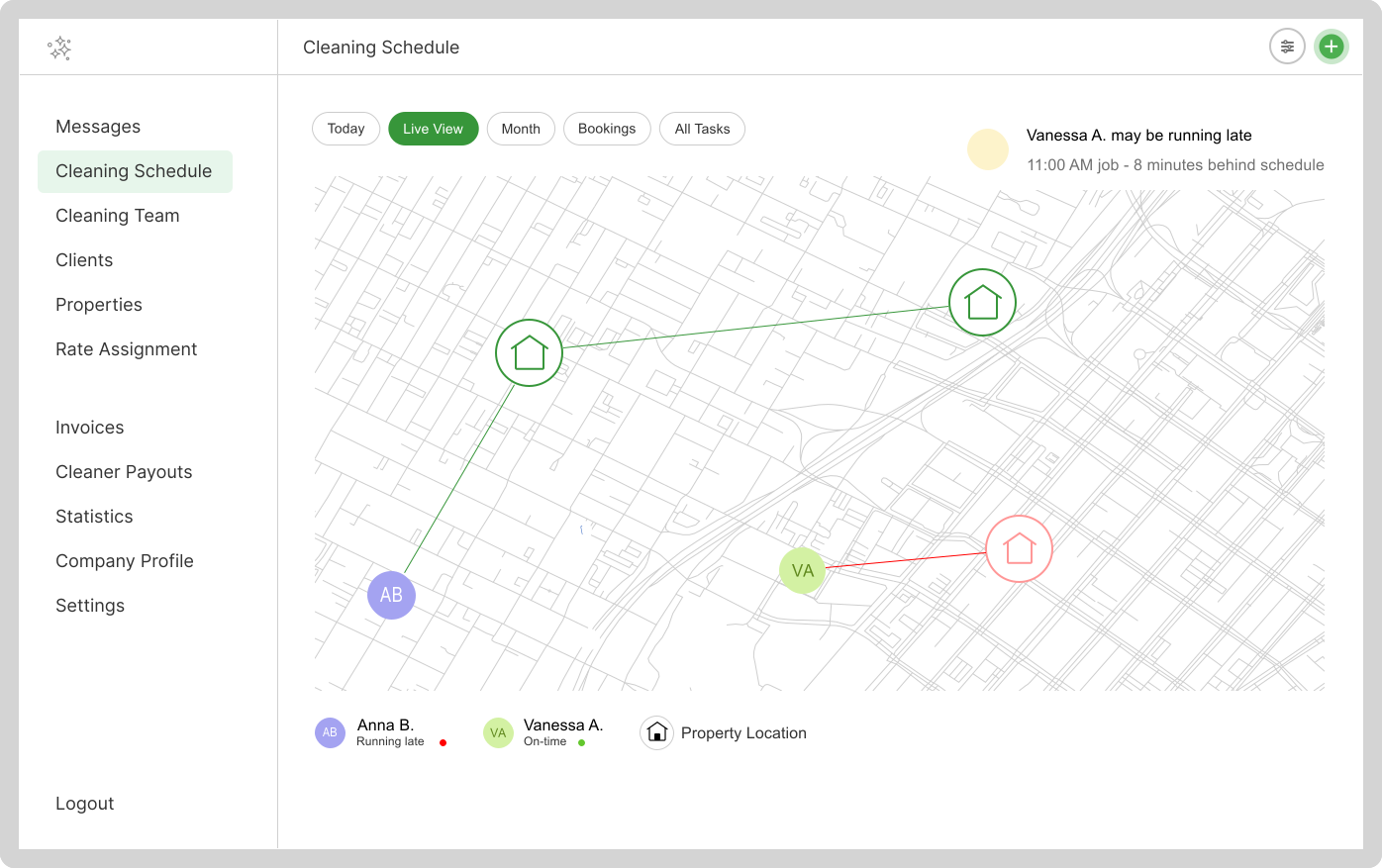
Live Map changes that. It gives you a real-time view of every cleaner's location alongside the properties scheduled for today — so you can see at a glance who's on time, who's running late, and where the next job is.
What Live Map shows you
When you open Live Map from your bookings dashboard, you see a single map view with two types of pins:
- Cleaner pins — the current GPS location of each active cleaner on your team, updated in real time as they move
- Property pins — every property that has a booking scheduled for today, with the assigned cleaner's name attached
Alongside each cleaner pin, you see a status indicator: on time or running late — calculated from their current location and the travel distance to their next job.
Why this matters more than you'd think
Most cleaning business owners underestimate how much time they spend on status updates. A quick survey of CleanerSync users before they started using Live Map found that the average owner was making 4–6 "where are you?" calls per day. Multiply that by every working day and it adds up to hours of lost time every month.
More importantly, those calls happen reactively — after something has already gone wrong. Live Map flips that. You see the problem before the client does, which means you can act proactively.
"I used to call my cleaners constantly. Now I just open the map. If something's off, I already know before my client texts me." — CleanerSync user
How the on-time vs. running-late indicator works
Cleaner Sync calculates the estimated travel time from a cleaner's current GPS location to their next scheduled property. If the remaining travel time is within a reasonable buffer of the booking start time, the cleaner shows as on time. If they're unlikely to arrive on schedule based on their current position, they're flagged as running late.
This works even for unassigned or flexible-time jobs — property pins still appear on the map, letting you see which cleaner is physically closest and reassign on the spot if needed.
Setting it up
Live Map requires location sharing from the CleanerSync mobile app. Here's how to get your team set up:
- Each cleaner installs the CleanerSync app (iOS or Android)
- When prompted, grant location permission — select "Always" on iOS or "Allow all the time" on Android for background tracking
- That's it — no additional setup is needed on the web dashboard
Once location is enabled, cleaners appear on the map automatically when they're active. There's no manual check-in required.
Combining Live Map with photo reports
Live Map tells you where your team is. Photo reports tell you what they've done. Together, they give you complete visibility into every job without being on-site yourself.
Cleaners upload before and after photos through the mobile app. Photos are timestamped and attached to the booking record — giving you a reliable record of when the cleaner arrived and when the job was completed. This is especially useful for billing disputes or client questions about job completion times.
A typical day with Live Map
- Morning: Open the map to confirm cleaners are heading to their first jobs. No calls needed.
- Mid-morning: Check for any running-late flags. If someone's behind, reach out or notify the client ahead of time.
- Afternoon: Review photo reports as jobs complete. All confirmations come through the app, not your phone.
- End of day: Every job confirmed, photos attached, team accounted for — without a single status call.
Live Map is a Pro feature
Live Map is available on the Cleaner Sync Pro plan. If you're on the Standard plan and want to try it, you can upgrade at any time from your account settings. Pro also includes custom rates, advanced invoicing, and priority support.
If you haven't tried Cleaner Sync yet, you can start for free — no credit card required. Live Map is one of those features that, once you have it, you won't want to run your business without.